MyAbseil - Compliance and Operations
  • Documentation
Select Page

How can we help?

⌘K
  • Clients
    • How to add a new Client
    • How to create a new Worksite
  • Operations
    • How to create an Operative
    • How to add personnel certifications
    • How to create a Job
    • How to assign Operative to Jobs
    • How to send notifications for work schedules
  • Operatives
    • How to add operatives certifications
    • How to manage operatives certification & competence
    • How to manage time off for your operatives
  • Suppliers
    • How to add a new Supplier
    • How to add a New Expense under a Supplier
  • Expenses
    • How to add a New Expense
    • How to allocate an Expense
  • Forms
    • Type of Forms
    • Create a new form
    • Question types explained
    • Completed Forms
    • Understanding the Forms Data Tabs
    • How to access completed forms
    • How to recall completed forms
  • Resources
    • What are ‘Resources’
  • Users
  1. Home
  2. Docs
  3. How can we help?
  4. Clients
  5. How to create a new Worksite

How to create a new Worksite

After a Client is created you can add Worksites and Jobs for that Client by navigating to the respective tabs
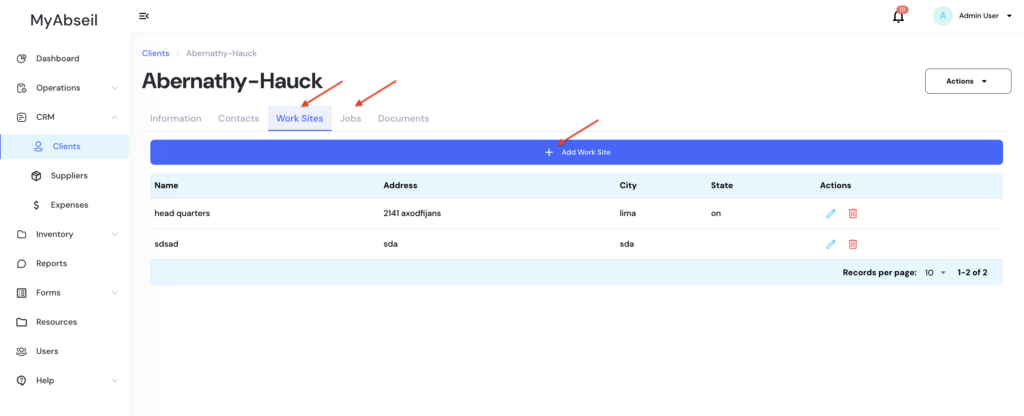
Please note that you can have multiple Work Sites for the same Client, and multiple Jobs for the same Worksite

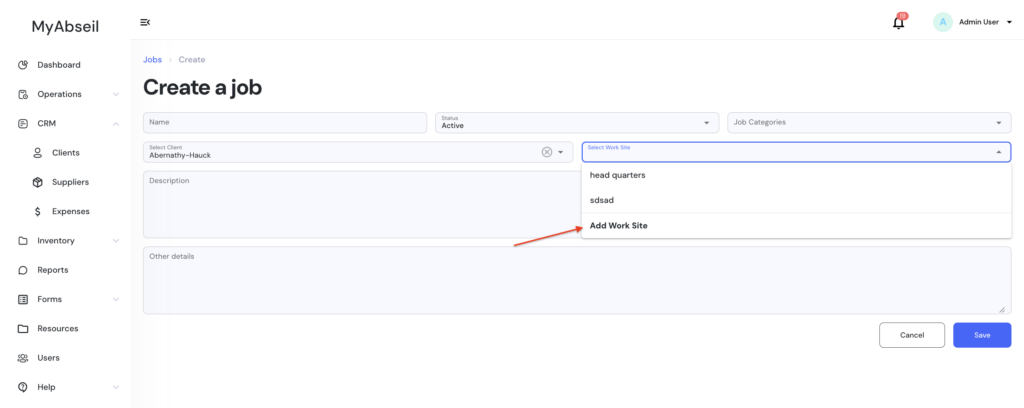
You can also create a new Worksite for an existing Client, on the fly, when you want to create a new Job
Doc navigation

← How to add a new Client
Was this article helpful to you? No Yes