MyAbseil - Compliance and Operations
  • Documentation
Select Page

How can we help?

⌘K
  • Clients
    • How to add a new Client
    • How to create a new Worksite
  • Operations
    • How to create an Operative
    • How to add personnel certifications
    • How to create a Job
    • How to assign Operative to Jobs
    • How to send notifications for work schedules
  • Operatives
    • How to add operatives certifications
    • How to manage operatives certification & competence
    • How to manage time off for your operatives
  • Suppliers
    • How to add a new Supplier
    • How to add a New Expense under a Supplier
  • Expenses
    • How to add a New Expense
    • How to allocate an Expense
  • Forms
    • Type of Forms
    • Create a new form
    • Question types explained
    • Completed Forms
    • Understanding the Forms Data Tabs
    • How to access completed forms
    • How to recall completed forms
  • Resources
    • What are ‘Resources’
  • Users
    • Create an account with MyAbseil
    • How to create a ‘Team Lead’ user
    • How to install MyAbseil app
    • How to log in
  1. Home
  2. How can we help?
  3. Forms
  4. How to access completed forms

How to access completed forms

Accessing Completed Forms

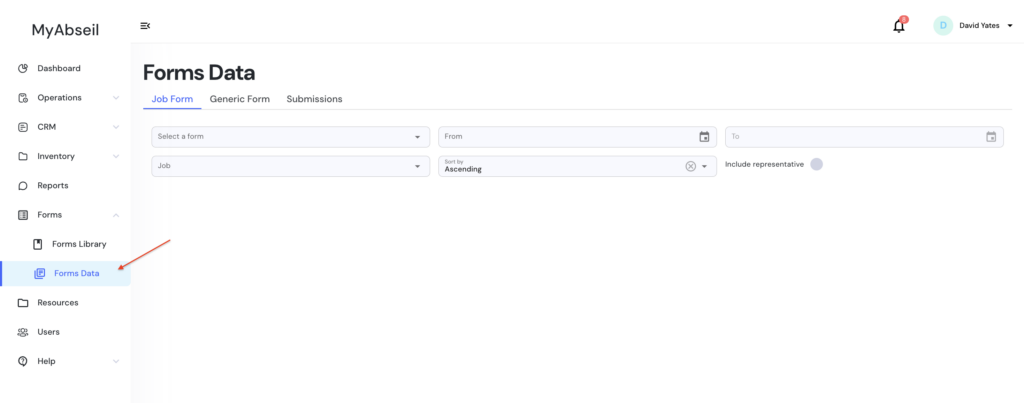
To view completed forms:

  1. Navigate to the Forms menu in the left sidebar.
  2. Click Forms Data.

This will open the Forms Data dashboard, where all submitted form data can be accessed.
Doc navigation

← Understanding the Forms Data TabsHow to recall completed forms →
Still stuck? How can we help?
Updated on 5 March, 2026
Was this article helpful to you? No Yes

How can we help?