MyAbseil - Compliance and Operations
  • Documentation
Select Page

How can we help?

⌘K
  • Clients
    • How to add a new Client
    • How to create a new Worksite
  • Operations
    • How to create an Operative
    • How to add personnel certifications
    • How to create a Job
    • How to assign Operative to Jobs
    • How to send notifications for work schedules
  • Operatives
    • How to add operatives certifications
    • How to manage operatives certification & competence
    • How to manage time off for your operatives
  • Suppliers
    • How to add a new Supplier
    • How to add a New Expense under a Supplier
  • Expenses
    • How to add a New Expense
    • How to allocate an Expense
  • Forms
    • Type of Forms
    • Create a new form
    • Question types explained
    • Completed Forms
    • Understanding the Forms Data Tabs
    • How to access completed forms
    • How to recall completed forms
  • Resources
    • What are ‘Resources’
  • Users
  1. Home
  2. Docs
  3. How can we help?
  4. Operatives
  5. How to manage time off for your operatives

How to manage time off for your operatives

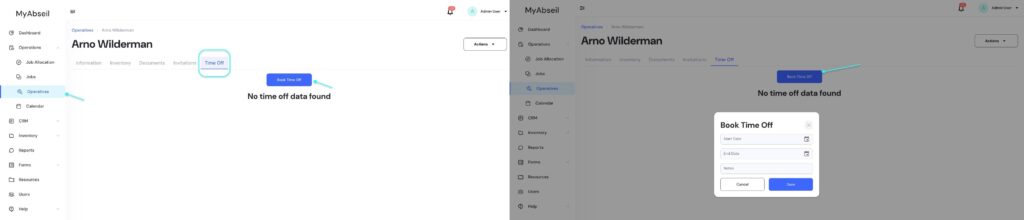
Navigate to ‘Operatives’ menu, select the required operative and go to the ‘Time Off’ tab to book time off.
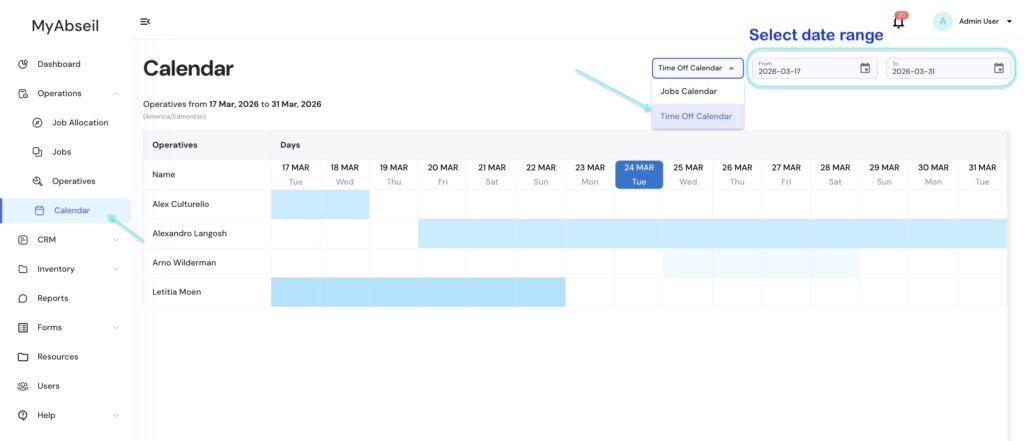
To view your operatives’ time off schedule, go to the Calendar menu, select Time Off Calendar from the dropdown, and choose your desired date range.
Screenshot

Doc navigation

← How to manage operatives certification & competence
Was this article helpful to you? No Yes